Most pages do not fail because the writer did not know enough SEO. They fail because the page feels like a wall of text.
Heading tags are one of the easiest ways to fix that.
They make your page readable for humans and they give Google a clean map of what your content covers.
Heading Tags Are Structure, Not Styling
Heading tags are HTML elements that label the sections of a page.
They tell browsers what is a heading, tell readers what each section is about and tell search engines how the page is organised.
They are not meant to be used because you want something to look bigger. That is a job for CSS.
Headings are about hierarchy.
How Google Uses Headings To Understand A Page
Google is trying to work out three things fast:
- What is this page about overall
- What are the main topics inside it
- How do those topics relate to each other
When your headings are clear, Google does not have to guess.
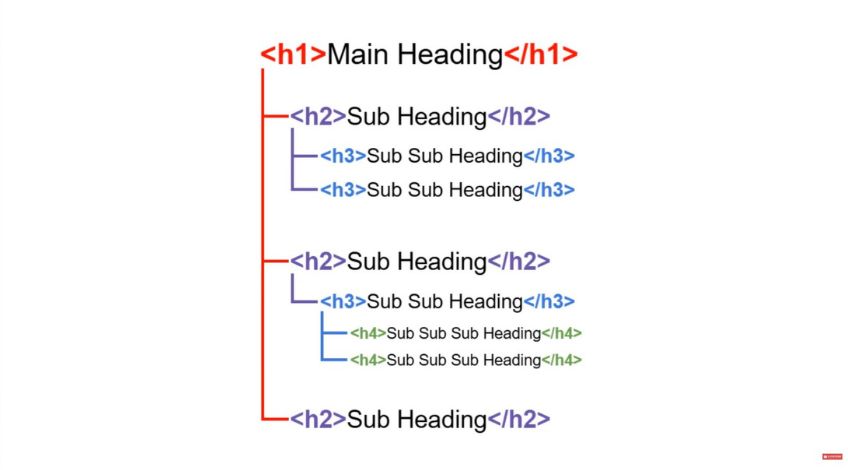
Your H1 states the main topic, your H2s show the big sections and your H3s show the smaller parts inside each section.
That extra context can help you show up for more relevant searches, especially when the headings naturally include keyword variations and related terms.
H1: The Single Clearest Signal On The Page
Your H1 is the main heading. In most cases, you want one H1 per page.
That keeps your topic obvious. It should match the purpose of the page and it should make sense for a real person landing on it.
Your target keyword usually belongs here, ideally near the start but it still needs to read naturally.
A good H1 feels like the title of a chapter. It sets expectations.
H2: The Big Sections That People Actually Scan
Most readers do not read every word. Instead, they skim first and H2s are what they skim.
Use H2s to break the page into the major sections. If you are writing a service page, your H2s might be things like what the service includes, pricing, areas covered, what to expect or FAQs.
If you are writing a guide, your H2s might be steps, key concepts, common mistakes or next actions.
H3 And H4: The Detail Layers
H3s sit under an H2 and they break a section down into smaller chunks.
H4s sit under an H3. Use them when a subsection still needs a bit more structure.
The key is to only go as deep as you need. If your section is short, an H3 might be enough.
If it is already clear, you might not need anything below the H2.
The One Rule That Keeps Everything Tidy
Do not skip levels. If you jump from an H2 to an H4, it suggests something is missing in between.
It is like writing Chapter 2 then suddenly adding a sub-subsection without the section it belongs to.
Keep it clean:
H1 → H2 → H3 → H4
How Headings Improve SEO Without Feeling Like SEO
Headings help in two ways that matter in real life.
First, they make your page easier to read. When people can scan and find what they need, they stay longer and bounce less often.
They also give Google more clues. Headings act like signposts and they tell Google what each section is about.
They can help your page rank for related searches, as long as the wording sounds natural.
How To Put Keywords In Headings Without Keyword Stuffing
A simple approach works best:
- Put your main keyword in the H1 if it fits naturally
- Use H2s that describe what the section actually answers
- Sprinkle keyword variations where they make sense, not everywhere
If every heading repeats the exact same phrase, it starts to look forced and it reads badly.
Your headings should sound like helpful labels, not a list of search terms.
SEO Heading Outline Example You Can Use Every Time
Let us say you are writing an article about title tags or a service page for emergency plumbing. The structure idea is the same.
Example for an informational guide:
- H1: What Are Heading Tags In SEO?
- H2: What Heading Tags Are And What They Do
- H2: H1 Vs H2 Vs H3 Vs H4 Explained
- H3: What To Put In Your H1
- H3: How To Write Useful H2s
- H3: When H3s And H4s Are Worth Using
- H2: The Biggest Heading Mistakes That Hurt Clarity
- H2: A Simple Way To Check Your Page Structure
That outline reads like a lesson. It is skimmable and every heading earns its place.
A Quick SEO Check For Heading Order And Relevance
Scroll the page and only read the headings in order but do it with a slightly critical eye. Ask yourself if you could understand what the page covers without reading a single paragraph.
If the headings feel like a clear set of answers to real questions, you are on the right track. If they feel like vague labels like “Overview” or “More Information”, they are not doing their job yet.
Look for repeated phrases as well,because if every heading says the same thing in a slightly different way, the page will feel bloated and Google will get less useful context.
Check that each H2 is a proper section and that your H3s genuinely sit under that section rather than being random extra headings.
Finally, if you spot an H4 anywhere, make sure it is actually needed and that there is a H3 above it, otherwise the structure will feel messy.