Images do a lot of heavy lifting on a page. They make your content easier to read, help people trust what they are seeing and often explain something faster than a paragraph ever could.
The problem is that Google does not experience an image the way a person does. Without a little help, it is guessing.
If you want search engines to properly understand your images, there are two simple places you can help them: the image file name and the alt text.
Alt Text Is A Description Google Can Actually Use
Alt text is a short written description of an image that lives in the background of your page. It is mainly there for accessibility.
Screen readers use it to describe images to people who cannot see them.
Google can also use it as another clue to understand what the image shows and how it connects to the rest of the page.
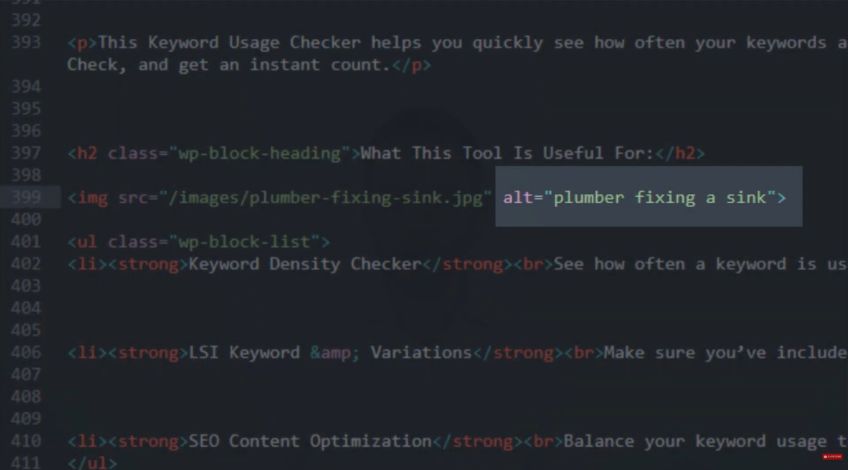
If your image shows a plumber fixing a sink, then “plumber fixing a sink” is exactly the sort of alt text you want. Clear, specific, normal.
Why This Supports Your Rankings
Alt text is not the same as your title tag or H1. It is not one of the big headline signals. But it supports the bigger story your page is telling.
Search engines work by building confidence. Your title tag and H1 say what the page is about and your URL backs that up. Your content expands on it and your headings add structure.
Your images should match the topic too and alt text helps prove they do.
When everything is aligned, Google has less uncertainty and that is exactly what you want.
File Name VS Alt Text
These two get lumped together but they are different jobs.
An image file name is what you upload. It should describe what is happening in the image, like plumber-fixing-sink.jpeg.
Alt text is the short description inside the page’s code. It can be similar but it does not need to match word for word. The goal is accuracy, not repetition.
Alt Text Writing Rules That Keep It Human
If you remember one thing, make it this: describe the image, not your keyword plan.
Good alt text usually includes:
- Who or what is in the image
- What they are doing
- Extra detail only if it matters
Bad alt text usually looks like a pile of phrases you want to rank for.
If you are writing a service page about “emergency plumbing”, do not turn every image into “emergency plumber Manchester” with slightly different wording.
That is not helpful and it is rarely natural.
Alt Text Examples For Local SEO Pages
Let’s say your page targets the keyword “emergency plumber Manchester” and you add three images:
Image 1: Plumber repairing a leaking tap
- File name: plumber-repairing-leaking-tap.jpeg
- Alt text: “Plumber repairing a leaking tap”
Image 2: Van parked outside a house at night
- File name: emergency-plumber-van-outside-house-night.jpeg
- Alt text: “Plumber’s van parked outside a house at night”
Image 3: Close up of tools on the floor
- File name: plumbing-tools-on-floor.jpeg
- Alt text: “Plumbing tools laid out on the floor”
Notice what is not happening. You are not forcing “same day call out” into the description just because it is a nice modifier for a title tag.
Alt text is not ad copy. It is a description.
Keyword Stuffing Is The Trap
People sometimes treat alt text like a hidden place to cram keywords because visitors do not see it.
That is exactly why it goes wrong.
If your alt text reads awkwardly, it is usually because it was not written for humans first. Keep it simple and accurate. That is enough.
Image Size Still Matters
Even perfect alt text will not help if your page takes ages to load.
Big image files slow things down, which hurts the user experience. You want your images compressed so they load quickly while still looking sharp.
Check Your Image Alt Text Before You Hit Publish
Run through your page and ask:
- Do my image file names describe what the images show
- Does every image have alt text that is accurate and natural
- Have I avoided forcing keywords
- Are my images compressed so the page loads quickly
If you do that consistently, your images start supporting your SEO instead of just decorating the page.