Keyword research can feel like a massive task. You open a tool, type in a word and suddenly you are staring at hundreds of ideas you do not know what to do with.
Google Search Console flips that around.
Instead of guessing what people might search for, it shows you what people have already searched for and where your website has already shown up in the results.
That makes it one of the quickest ways to find keywords that are worth your time.
Why Search Console Is A Shortcut To Smarter Keyword Research
Most keyword tools start with an estimate. They predict what might get searched and what might be hard to rank for.
Search Console works differently. It shows real data from Google, based on your actual website.
That includes search terms where you:
- already get impressions
- already appear for related phrases
- might be close to ranking properly
Even if your site is not getting loads of clicks yet, impressions alone can tell you there is an opportunity sitting there.
Start With The Performance Report
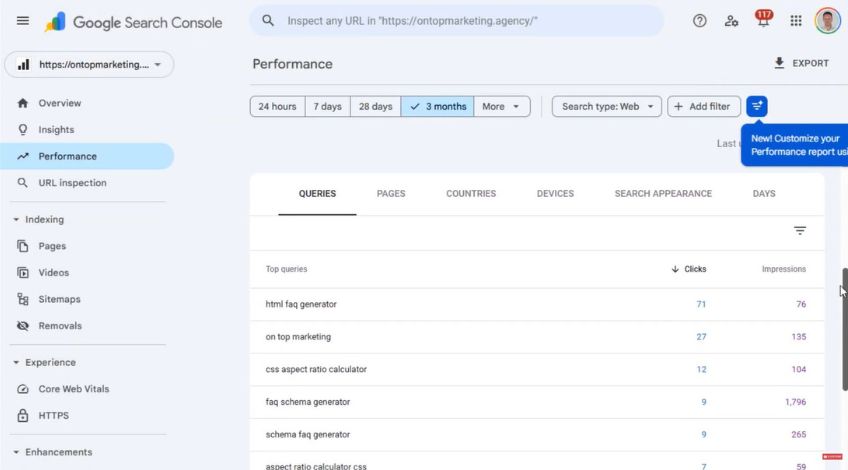
Head into Google Search Console and click Performance.
This report is where the keyword insights live. You will see a list of queries people typed into Google and next to them, the results your site has had.
Those queries are your keyword list. It is not perfect but it is honest.
The One Metric You Should Care About First
Clicks are great but impressions are often more useful at the start.
Impressions mean Google is already willing to show your website for that search term. That is important because it means you are not starting from zero.
If you find a keyword with steady impressions but hardly any clicks, that usually points to one of these problems:
- Your page is not matching what the person wants
- Your title or description is not tempting enough
- Google is unsure which page to rank
Fixing those is often far easier than trying to break into a keyword where you have never appeared at all.
How To Tell If A Keyword Is Actually Worth Targeting
Not every query in Search Console deserves attention. Some will be random, some will be too broad and some will bring the wrong type of visitor.
A fast way to filter them is to ask:
“Could this turn into a lead or sale?”
“Does it fit what my business actually offers?”
and “Would a good page for this build trust with the right audience?”
This stops you wasting time chasing traffic that never converts.
Look For The “Almost There” Keywords
Some of the best keywords are the ones where Google is already testing you.
These are usually phrases that are closely linked to your services, have clear intent behind them and show up often enough to matter.
For example, if you run a trades business, you might see searches like “emergency plumber near me”, “how often should a boiler be serviced” or “scaffolding higher prices”.
Each one needs a different type of page to work well. That is where most sites go wrong.
Match The Keyword To The Right Page Type
A keyword is not just a phrase. It is a clue to what the person wants. If you try to rank the wrong page type, Google will not push it far and users will leave quickly.
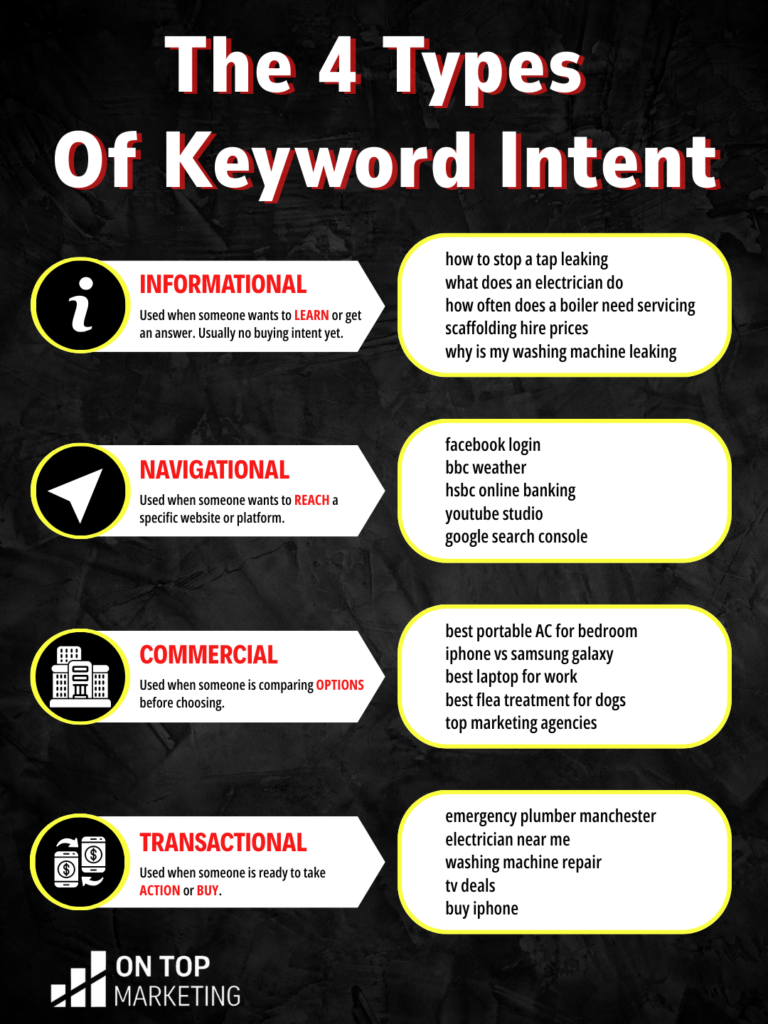
Here is how it usually breaks down:
- Informational keywords suit guides, FAQs, blog posts and videos
- Navigational keywords are mostly for your brand name and branded searches
- Commercial keywords suit comparison pages, pricing guides and “best” lists
- Transactional keywords suit service pages with clear calls to action
If someone searches “scaffolding higher prices” they want price info, not a generic service page.
If your page does not answer the question, they will leave and Google will pick someone else.
Use Page Filters To See What Each Page Is Pulling In
Search Console can also show you keyword data for a specific page.
This is a simple way to spot pages that are ranking for the wrong searches, trying to cover too much in one place and getting impressions for keywords you have not fully written about yet.
When you review one page at a time, you can decide whether to improve it or split the topic into a new page that fits better.
The Quick Wins Most Websites Miss
Some keywords already sit on your doorstep. You might find queries where your website gets impressions but the page has not been built around that search properly.
That is often the easiest growth lever because you are improving alignment, not building from scratch.
A few common fixes:
- Add a section that answers the exact question people are searching
- Update headings so they reflect the keyword intent more clearly
- Rewrite the page title so it matches how people actually search
- Create a dedicated page if the keyword deserves its own space
Small improvements can make a big difference when Google is already sending you impressions.
What To Do Once You’ve Found A Strong Keyword
When you find a keyword that looks valuable, the next step is simple. Make a page that genuinely deserves to rank for it.
That means answering the search properly, keeping the content clear and easy to skim, and making the next step obvious if the visitor is ready to enquire.
Google Search Console shows you what the market is already asking. If you build pages that match those searches, you stop chasing rankings and start earning them.