
Duplicate content is one of the most common problems on a website yet many business owners do not realise it is happening.
It often appears when a page can be reached through several URLs that show the same or very similar content.
This is where canonical tags become essential.
A canonical tag tells Google which version of a page should be treated as the main one.
It is a small piece of code that sits quietly in the background but plays a very important role in keeping your rankings stable and your signals consistent.
Why Duplicate Content Happens Without You Noticing
Most duplicate content issues are not caused by writers copying text but by the way websites are built.
A simple filter or tracking link can unintentionally create several URLs for the same page.
This is especially common for e-commerce sites. A category page might look identical, yet the URL can change each time someone filters by colour or price.
Google sees each of those URLs as separate pages unless you guide it properly.
The same thing can happen with product variations, session IDs and marketing parameters.
These pages are helpful for users but they confuse search engines without a clear signal that says which one should count.
How A Canonical Tag Clears Up Confusion
A canonical tag acts like a signpost. It tells Google which URL is the primary version so all ranking signals can be passed to the correct page.
If ten filtered versions of a category page exist, you do not want Google treating each one separately.
Without a canonical tag, you risk:
- Duplicate content issues
- Competing with yourself in search results
- Incorrect pages being indexed
- Ranking signals being diluted
Adding a canonical tag prevents this by pointing everything back to the main URL.
Why This Matters For Your Rankings
When Google sees many pages with the same content, it must decide which one to index.
If your site sends mixed signals, Google may pick the wrong version. That can lead to weaker rankings, split authority and a loss of traffic.
A canonical tag removes this confusion and gives Google a clear answer.
It keeps your content organised and ensures the right page is given full credit.
Most Websites Handle Canonical Tags Automatically
Modern content management systems usually generate canonical tags for you.
This is helpful but it can also lead to problems when something is set incorrectly.
A small mistake can cause a key page to disappear from search results because you have effectively told Google to ignore it.
This commonly happens when a page has been duplicated during development and the canonical tag from the original is left unchanged.
The new page then points to the wrong URL and gets removed from the index.
For this reason, manual checks are essential even if your system claims to handle everything automatically.
How To Check Your Canonical Tags Quickly
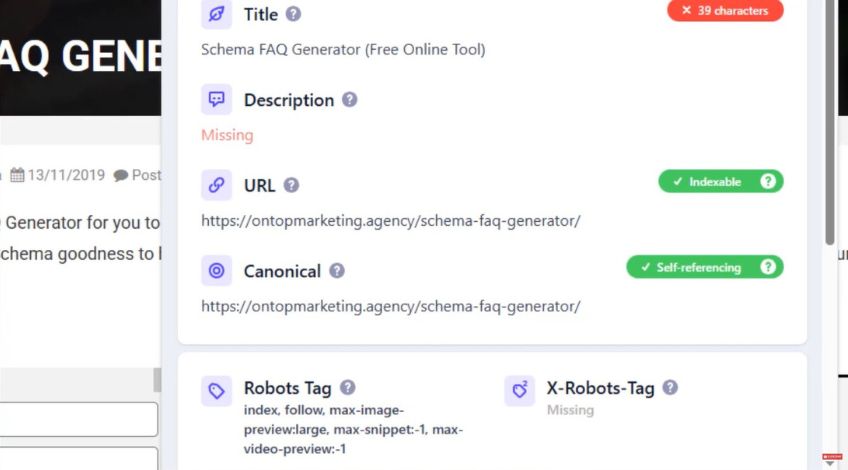
One of the easiest ways to review your canonical tags is to use a browser extension like the Detailed SEO extension.
It shows you the canonical URL for any page in one click so you can confirm whether it is pointing to the correct place.
You can also check inside your page source or run a full website crawl using tools such as Ahrefs. These tools highlight any pages with missing or incorrect canonical tags so you can fix them before they cause a drop in traffic.
The main rule is simple: Make sure every important page is self referencing unless you have a deliberate reason to merge it with another URL.
A Simple Step That Avoids Bigger Problems
Canonical tags do not change the look of your site or change the content either. They simply help search engines understand your structure and treat your pages correctly.
They exist to reduce confusion. When several URLs show the same content, they tell Google which version should represent your page.
This prevents duplicate content issues, protects your rankings and keeps your site tidy in the eyes of search engines.
The key idea is that clear signals are a form of protection.
Canonical tags stop Google from making assumptions about your website and stop you from losing traffic through avoidable technical issues.
Make sure they are in place, check that they are correct and review them whenever you launch new pages or update your site structure.