
Search engines can only show pages that they have added to their index.
This sounds simple, yet it is one of the biggest reasons why so many business owners struggle to understand why certain pages never appear in Google.
A page can be well written with strong backlinks and helpful content but none of that matters if Google is told to ignore it.
This is exactly what happens when a no index tag is left in place.
Why Indexing Is Needed Before Any Rankings Can Happen
Once Google has discovered a page, it then needs to decide whether that page should be stored in its index.
You can picture the index as a very large library that Google uses every time someone searches for something.
During this stage, Google reads the text, images, videos and metadata on your page. It tries to understand what the content is about and whether it is suitable for search results.
Only once a page is added to this index can it appear for any keywords at all.
Crawling does not guarantee this.
A page can be found and still never make it into the index if Google decides it is too thin, too similar to another page or blocked by a technical setting.
How A No Index Tag Affects Your Search Eligibility
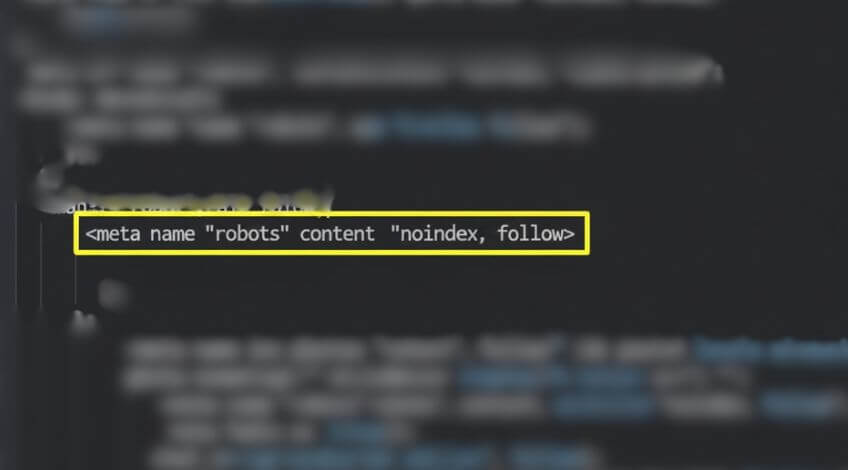
A no index tag is a small piece of code placed on a page that tells Google not to include it in the index.
It is a direct instruction. When Google sees this tag, the page becomes ineligible for search results.
There are times when this is intentional. Thank you pages, private content and temporary pages often use no index tags because they are not meant to be found through search.
The bigger problem is when the tag appears by accident.
Developers often add no index tags during the build phase of a new site so the staging environment does not get indexed.
When the site goes live, the tag needs to be removed but many forget.
The result is a sudden drop in visibility and a set of pages that look fine on the surface but can never appear in Google.
The same mistake happens with single pages. A developer might block a page while working on it, then forget to remove the tag before launch.
Why A No Index Tag Blocks Search Results Completely
Unlike other issues that reduce rankings, a no index tag removes the page from the index altogether.
It is a binary instruction. The page is either allowed to appear in search results or it is not.
A no index tag makes the choice for Google.
When this tag is present, Google will still be able to crawl the page. It can read the content and see the links. It will simply be told to ignore it for search.
This is why many business owners struggle to diagnose the problem. Everything looks normal when you view the page but the code tells a different story.
Easy Ways To Spot Accidental No Index Tags
Make it part of your launch checklist. When a new website goes live, one of the first things you should check is whether the no index tag has been removed from the site.
If you are publishing new pages, check the source code before pushing them live. It only takes a moment and it saves weeks of confusion later.
Tools like Screaming Frog can scan your entire site and flag any pages with no index tags. This is helpful for large websites with lots of content.
Why This Simple Check Helps Every Business Owner
If a page is supposed to bring in traffic or support a marketing campaign, it must be indexed. Without this step, the page is invisible to search engines and cannot help your business in any way.
Business owners often assume that improving content or building links will solve indexing problems.
In reality, technical settings like no index tags sit at the centre of how Google understands your site. Fixing these issues should always come first.