
Most pages do not struggle to rank because the business “doesn’t do SEO”.
They struggle because Google cannot quickly tell what the page is about and searchers cannot quickly tell why they should click.
The title tag is one of the easiest places to fix both problems.
If you get your title tag right, you make your page clearer to Google and more tempting to the person scanning the results.
What Is a Title Tag and Where It Shows Up in Google
Google uses lots of signals to understand a page but the title tag is one of the most direct.
A title tag is the clickable headline you see in Google search results. It is not the same as the big heading on your page.
It tells Google what you think the page is about, in a short, concentrated way. It also tells the searcher what they will get if they click.
It lives in the background but it has an outsized impact because it is often the first impression your page makes.
A good title tag does two things at once: it signals relevance and it earns the click.
The Three Core Places Your Keyword Needs To Live
If you are targeting a specific keyword, you usually want it in three places:
- Your title tag
- Your H1 tag
- Your URL
When the keyword is missing from these, Google has to work harder to understand the page.
When it is present and consistent, you have laid down a clean foundation.
Title Tag vs H1: Same Topic, Different Job
Your H1 is the main heading on the page. It should be written for readers first and it should feel natural when someone lands on the page.
Your title tag is written for the search results. It can be punchier, more benefit led and more “clickable” because it is competing against other listings.
That is why you will often keep the H1 simple but give the title tag extra context.
Keep It Short Enough To Show Properly
Title tags can get cut off in search results. A practical guideline is to aim for under roughly 60 characters.
It does not have to be perfect but shorter titles are usually clearer and more readable. They also tend to carry the main message before any cutting happens.
Put The Main Keyword Near The Start
From an SEO perspective, it is smart to include the main keyword in your title tag, ideally close to the beginning.
This is not about gaming anything; it is about clarity.
People scan results fast and Google is also looking for a clear match between the search term and the page.
If your keyword is buried at the end, you often lose both relevance and attention.
Use Modifiers To Target Extra Searches And Improve Clicks
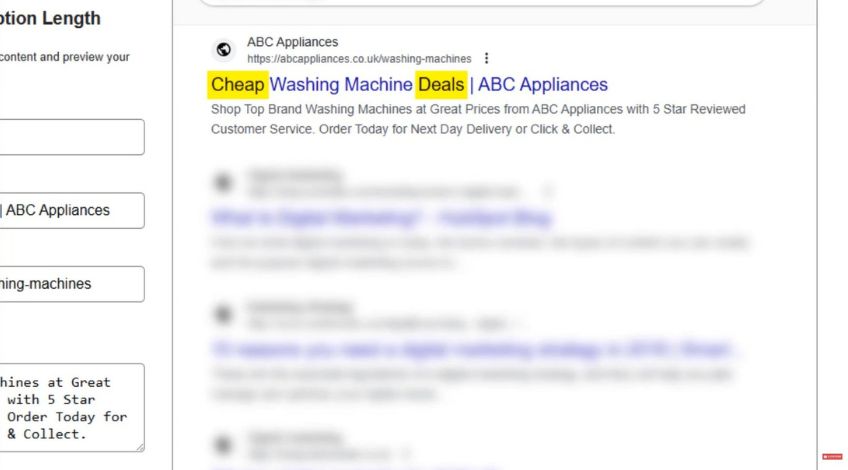
Here is where you can get more creative without making the page look spammy.
Your title tag can include modifiers that you might not want in your H1. These are extra words that reflect how people search, especially when they are close to buying.
For an e-commerce example:
H1: Washing Machines
Title tag: Cheap Washing Machine Deals | Brand Name
The modifier “cheap” and “deals” introduces transactional intent without cluttering the on page heading.
For a service example:
H1: Emergency Plumber Manchester
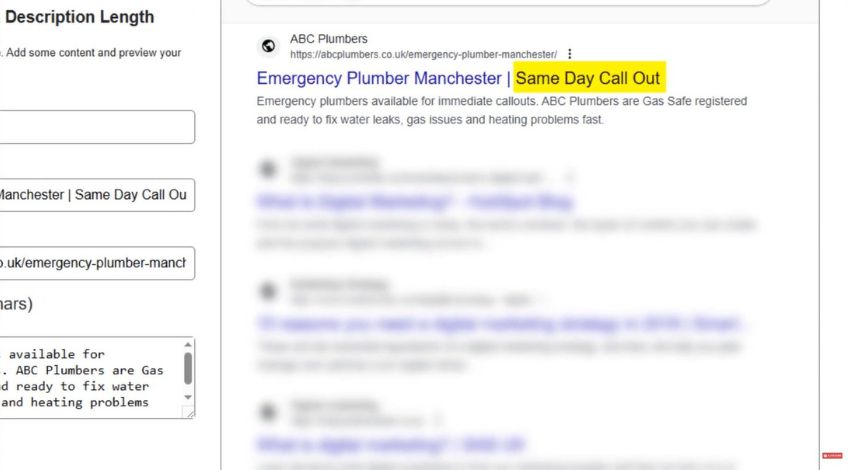
Title tag: Emergency Plumber Manchester | Same Day Call Out
That last phrase gives the searcher a reason to choose you right now, which is exactly what someone in an emergency is trying to solve.
Do Not Promise Something The Page Does Not Deliver
A title tag can win the click but it cannot save the page if the content does not match.
If you add “same day call out” but the page is vague, slow to act on or hard to contact you from, people will bounce.
That is a bad experience for users and a bad signal for Google.
So keep your title tag honest. Make it specific but make sure the page backs it up.
A Quick Title Tag Template You Can Reuse
If you want a simple starting point, use:
Primary keyword + strong modifier | Brand name
Then adjust based on the page type:
For service pages, add speed, location or availability
For product pages, add deals, price ranges or key features
For guides, add “how to”, “explained”, “checklist” or “step by step”
You do not need to overthink it. The goal is clear topic plus clear benefit.
Title Tags Help You Avoid Thin, Confusing Pages
When you sit down to write a title tag, you are forced to answer one question: What is this page actually for?
If you cannot write a clean title tag, it is often a sign the page is trying to cover too much or the keyword targeting is muddled.
Fixing the title sometimes reveals a bigger content issue, which is useful.
Title tags are small but they are not minor. They are one of the fastest ways to make your SEO more focused and one of the simplest ways to win more clicks from the rankings you already have.